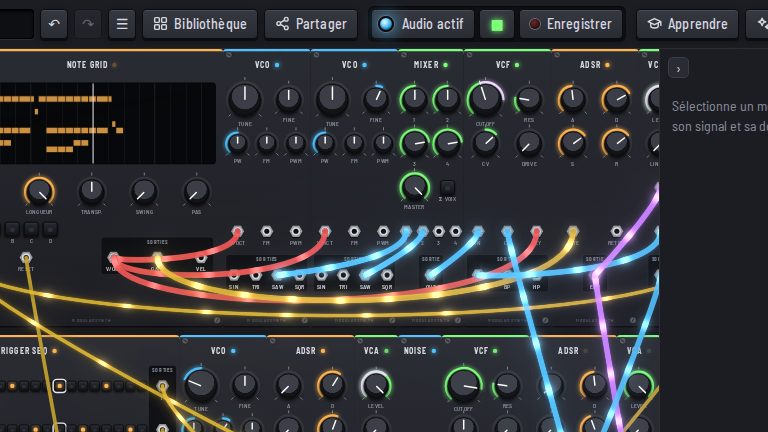
The first time you open it, ModularSynth loads a small synth that is already patched. In the order the sound travels:
- one module receives the notes you play (MIDI→CV);
- one module makes the sound (VCO);
- one makes it darker or brighter (VCF, a filter);
- two switch the note on when you press and off when you let go (ADSR and VCA);
- a last one sends it to your speakers (Output).
No need to learn the acronyms: each has its page, and Modular words explains them.
1. Start the audio
Click Start audio, in the middle of the top bar: your browser only allows sound after a click. The lamp lights up blue.
2. Play a note
Press A S D F G H J K on your keyboard (on QWERTY): each key plays a note. Z and X change the octave. You can also play the on-screen keyboard at the bottom, or plug in a MIDI keyboard.
3. Turn a knob
Drag up or down on the VCF’s Cutoff knob while holding a note: the sound opens up or gets muffled. The scroll wheel works too, and Shift gives fine control. Right-click to type an exact value.
4. Patch a cable
Drag from an output jack to an input jack: matching jacks light up while you drag.
The VCO has four outputs, one per waveform: Sin (soft), Tri, Sqr (hollow) and Saw (bright). In the starting patch, Saw goes to the filter. Drag a cable from Sqr to the VCF’s In input: an input takes only one cable, so the new one replaces the old one, and the sound turns hollow. Right-click a cable to remove it; Ctrl+Z undoes.
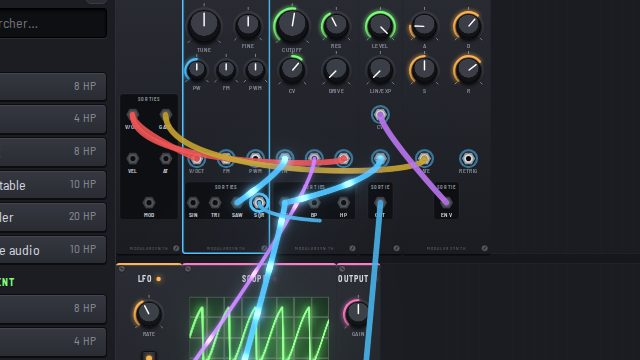
A cable’s color tells you what it carries: blue for sound, purple for modulation, yellow for a trigger, red for note pitch.
What next
Add modules from the left column (see the 2D view), open a preset, or follow chapter 1 of Learn, which does all this step by step from an empty rack.