In a modular synth, the machine can play by itself. It all starts with a clock, which sends a pulse at every step; sequencers move forward on each pulse and send notes or triggers.
The Clock, the heart of the tempo
The Clock sets the tempo for the whole patch. The ▶ / ■ button in the top bar starts and stops the clocks. The Clock can also follow a DAW’s MIDI clock (see Keyboards and MIDI). A sequencer plugged into a running clock locks onto the current bar by itself.
Three sequencers
- The Step Seq loops a short melody set with knobs, step by step.
- The Trigger Seq is a drum machine: a row of steps switched on or off per track, for kick, snare, hi-hat…
- The Note Grid is a piano roll: it plays notes of different lengths, chords, with velocity.
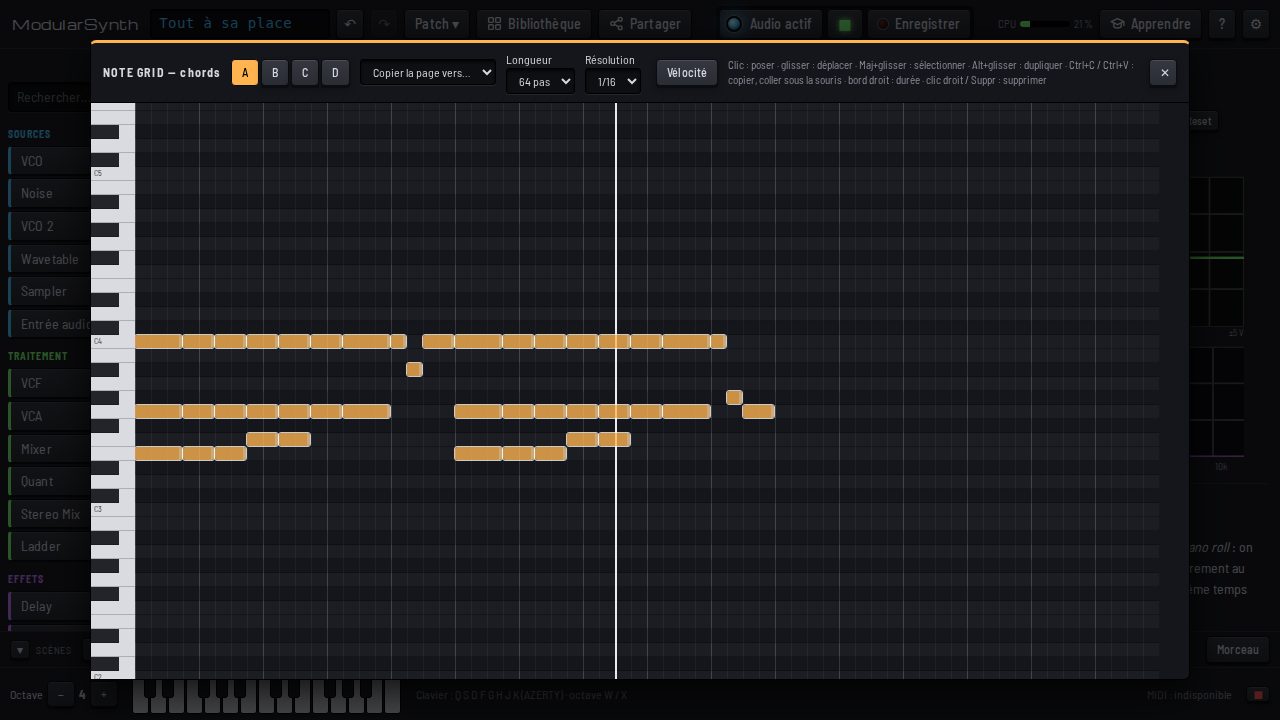
Editing the Note Grid
The Edit button opens the full-size piano roll: Shift+drag to select, copy and paste, velocity. The Step setting picks 1/16 or 1/32: at 1/32, each clock pulse plays two steps, thirty-second notes for rolls and ornaments, with no rewiring. Swing works on the half step.
Four pages per sequencer
The Note Grid and the Trigger Seq have four pages, A to D: a verse, a chorus, a break. Click a letter: its page takes over at the end of the current loop, so you stay in time. In the editor, one tab per page and Copy the page to… to start from a variation. Scenes remember the chosen page.
Notes that are always right
A Quant snaps any voltage to the notes of a scale: put an S&H or an LFO before it and a melody writes itself without ever sounding wrong.