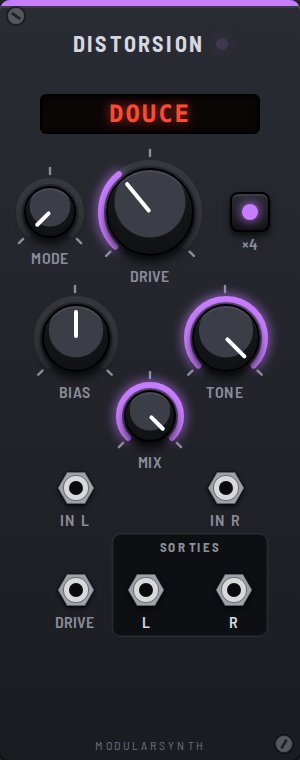
A distortion squashes the tops of the waves: the sound gets thicker, fills up with harmonics, and turns more aggressive. This is non-linearity: the output no longer follows the input in proportion.
Controls
- Mode: the saturation curve, shown at the top. SOFT rounds off the peaks like a tube amp; HARD cuts them clean, like a fuzz pedal; FOLD bends the signal back inward when it goes over, each fold adding harmonics: the metallic "West Coast" sound. CHAINSAW clips unevenly and boosts the upper mids near 1 kHz: the "chainsaw" grit of metal pedals.
- Drive: the boost before the curve (from 1 to 50). The volume is balanced out: Drive changes the character, not the level.
- ×4: oversampling, explained below.
- Bias: shifts the signal before the curve; the distortion becomes uneven and adds even harmonics, which sound warmer. The shift is removed at the output.
- Tone: softens the highs after the distortion.
- Mix: the balance between the original sound and the saturated one.
Aliasing
A distortion creates harmonics above 24 kHz, which digital audio cannot hold: they "fold back" into stray frequencies with no musical link to the note. With ×4, the curve runs four times faster, then the too-high harmonics are filtered out. Switch it off on a high, heavily saturated note: you hear whistles that ignore the melody. In return, ×4 softens the very top end and delays the sound by 0.3 ms.
Inputs and outputs
- In L, In R: the sound to process (In R copies In L).
- Drive: CV for the drive (+1 V = twice as much).
- L, R: the processed sound.