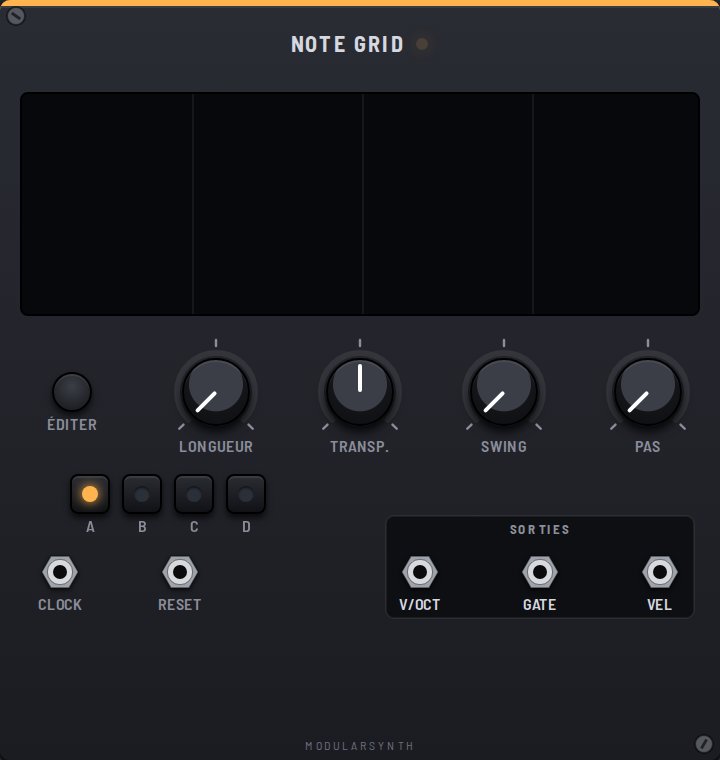
The Note Grid is a piano roll style sequencer: you draw notes on a grid. Unlike the Step Seq, notes can sound together (chords) and each has its own length.
The editor
Edit opens the grid full size: click to place a note, drag to move it, drag its right edge to change its length, right-click to remove it. Ctrl+Z undoes each move.
Pages
Page A, B, C or D: four grids, only one playing, shared controls. The chosen letter blinks, then its page starts on the next loop (right away when stopped, or on reset). In the editor, the A–D tabs write each page; "Copy the page to…" makes a variant. MIDI learn on a letter drives the page: a note steps to the next one, a CC sweeps A to D.
Controls
- Length: 16, 32 or 64 steps before it loops.
- Transp: transposes the whole grid, from −24 to +24 semitones.
- Swing: delays the even steps by a fraction of a step.
- Step: 1/16, one step per edge (sixteenths from the Clock's ×4); 1/32, two steps per edge: thirty-second notes. Switching keeps the tempo: notes are rescaled.
Inputs
- Clock: moves one step forward on each rising edge (two with Step at 1/32).
- Reset: arms a return to the start; the next clock edge plays step 1.
Outputs
Polyphonic outputs: one voice per note, per "Voices" in the ⚙ menu.
- V/Oct: the pitch of each voice (C4 = 0 V).
- Gate: 10 V for the length of the note.
- Vel: the note velocity, from 0 to 10 V.