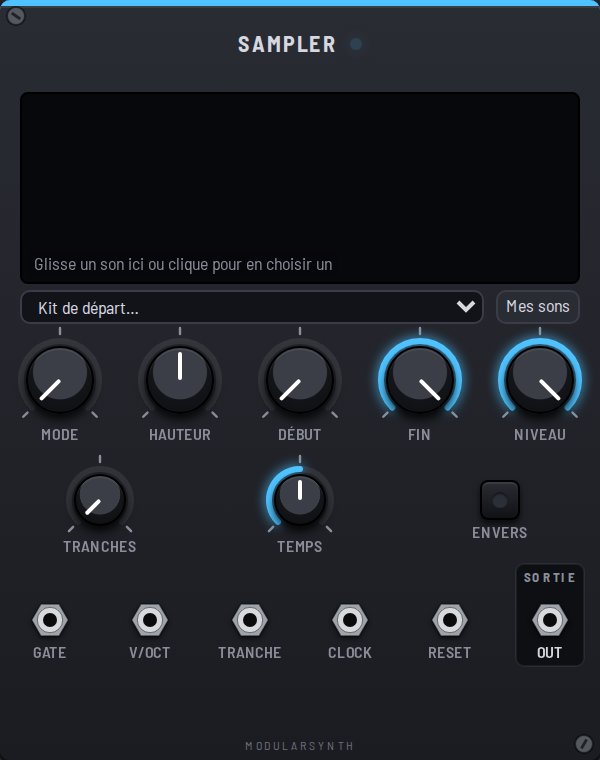
A sampler plays a sound that was already recorded: a drum hit, a voice, a loop, a chord. Drag an audio file onto the screen (or click it to pick one), or take a sound from the starter Kit. The sound is kept in your browser, and travels with an exported patch.
Controls
- Mode: One-shot plays the sound to the end on each rising edge at Gate (a new hit cuts off the last one); Gate plays while the gate is high; Loop repeats while the gate is high, or nonstop if nothing is patched into Gate.
- Pitch: transposes in semitones. Higher also means faster, like a sped-up record.
- Start and End: the part of the sound that plays.
- Slices: cuts that part into equal pieces (1 to 16).
- Beats: with a clock patched in, the loop stretches over exactly this many beats.
- Level: the volume; the sound is first brought up to ±5 V, even if it was recorded quietly.
- Reverse: plays the sound backwards.
Inputs
- Gate: triggers the sound.
- V/Oct: the pitch, polyphonic; +1 V plays one octave higher.
- Slice: picks the slice (0 to 10 V spread across the slices).
- Clock: in Loop mode, locks the speed to the tempo (the pitch then follows the clock).
- Reset: restarts the sound from the beginning.
Outputs
- Out: the sound, in mono.