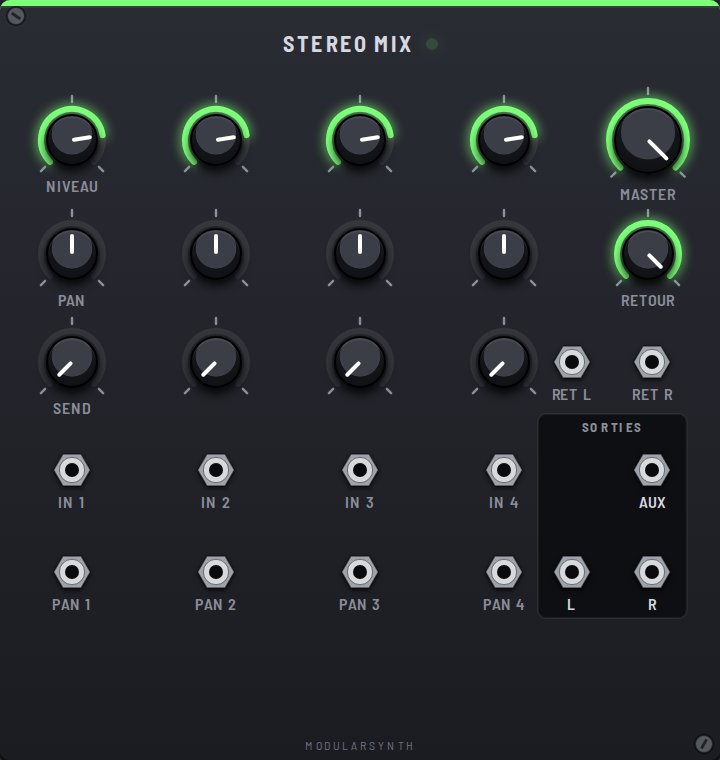
The Stereo Mix gathers four sounds and places them in space, between the left speaker and the right one. Think of it as a tiny studio console: each channel has its own volume, its own place, and its own share sent to an effect.
Channel controls
- Level: the channel volume.
- Pan: where the sound sits, from hard left to hard right. Panning is "constant power": in the center, each side gets 71% of the signal (−3 dB), so the sound keeps the same perceived volume as it travels from one side to the other.
- Send: how much of the channel goes to the Aux output, after the Level.
Global controls
- Master: the volume of the whole mix.
- Return: the volume of the sound coming back from the effect.
Inputs
- In 1, In 2, In 3, In 4: the sounds to mix; polyphonic voices are summed.
- Pan 1, Pan 2, Pan 3, Pan 4: pan CV (±5 V = from one edge to the other), added to the knob. A slow LFO here makes a sound drift around.
- Ret L, Ret R: the stereo return from the effect. Ret R copies Ret L when nothing is plugged into it.
Outputs
- Aux: the send to an effect (Delay, Reverb).
- L, R: the stereo mix, to patch into the Output.
Series or parallel effects
Patching an effect between a sound and the console is a series effect: the whole sound goes through it. The Aux send is a parallel effect: one shared effect, and each channel picks with Send how much it sends there.